Pipingmind IDF viewer
100% FREE
IDFs are Intermediate Data Files or Transfer Files. Pipingmind parses your Isogen IDF and returns a 3D scene to your browser for interactive viewing. Files are processed in memory for that purpose. We do not intentionally store uploaded IDF files after processing is complete.
Everything in one viewer
Built for piping engineers
Add multiple isometric IDFs to view complete piping network in 3D — explore, verify and review your isometrics together.
Flanges & fittings
Weld-neck hubs, valves, tees, reducers and elbows rendered in 3D and sized by the pipe size and rating.
Flow-direction arrows
Flow chevrons painted along each run, scaled to pipe size so direction is always clear.
Precise measure tool
Snap between elbow centers, supports and picked points to read true X / Y / Z deltas and distances.
Move IDFs by delta
Reposition any IDF layer by a measured delta to align isometrics in place.
Your support-type mapping
Map support functions based on pipe direction, friction to your company's own support types.
Open your isometric in 3D within seconds
Verify tie-in sequences, walk true pipe lengths, and visualize supports against span requirements.
Visualize complete piping network in 3D by importing multiple IDFs at once
Explore the 3D view of the complete piping network and catch any connectivity issues just before releasing the isometrics for fabrication.
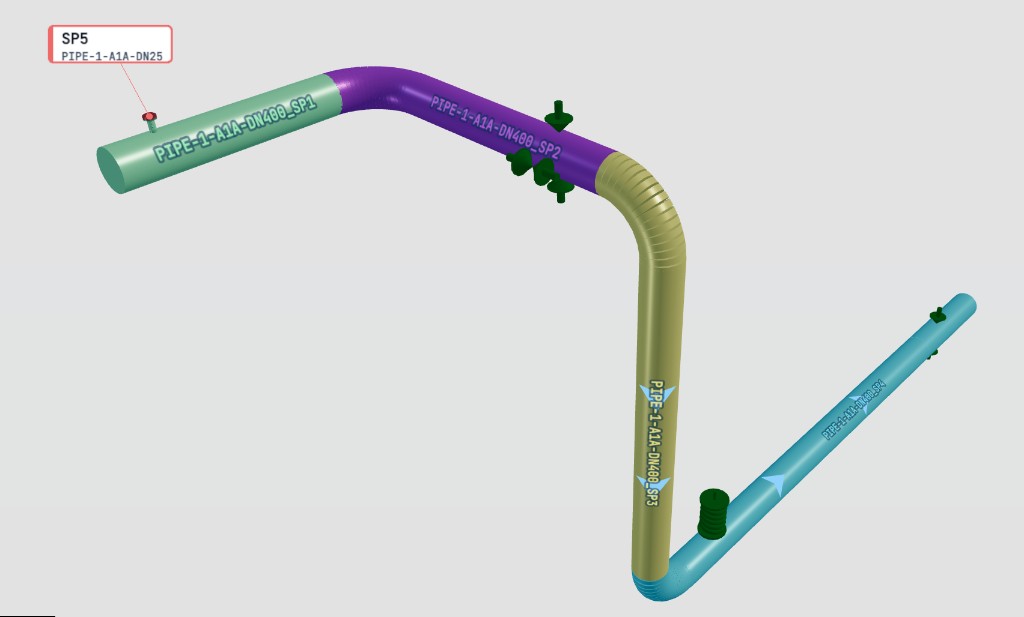
Visualize every spool with a distinct color
Turn on spool identification to paint each spool in a distinct colour. Tell spools apart at a glance, verify spool breaks, and check true lengths in 3D before you release isometrics for fabrication.
How it works
Three easy steps
Drop your IDF file
Select one or more Isogen IDF files. They are sent to Pipingmind's API to build the 3D scene. We do not intentionally retain them after processing.
Rendered in your browser
The 3D scene returns to your browser for interactive viewing, measurement, and export.
Review, measure, export
Explore the model, take measurements, and export a PDF isometric from your browser.
Frequently asked
Does my IDF data get uploaded anywhere?
When you use the IDF Viewer, your file is sent to Pipingmind's API over HTTPS so we can parse it and build the 3D scene. The file is processed in server memory for that request. Pipingmind does not intentionally store uploaded IDF files after processing completes. Rendering, measurement, and export then run in your browser.
Is my IDF file stored on your servers?
IDF files are processed in server memory to build the 3D scene. Pipingmind does not intentionally store uploaded IDF files after processing is complete, except where temporary buffering or retention is technically necessary to deliver the service or required by law.
Does it work offline?
The viewer needs a network connection to parse new IDF files. After a scene is loaded, you can continue reviewing it in your browser until you refresh or load another file.
What files are supported?
Isogen IDF (isometric drawing) files. You can load several at once and overlay them in a single 3D view.
Is it free?
Yes — the IDF viewer is free to use right now. Just open it and drop in a file.